App lifecycle
A conversation keeps the version it started on.
An Arbor app changes in small, named steps, and nothing you publish ever reaches into a conversation that is already running. This page explains the pieces, then follows one app through a first publish, a settings change, new code, a gradual move and a rollback.
Done by a coding agent
arbor settings set, reviews the draft and publishes revision 7. The conversation opened before stays on revision 5, and a new one opens on 7. It goes wrong on screen too: two commands the allowlist refused, and a model the local node can't reach, so the last chat on revision 7 fails with "model not found". The list of revisions at the very end shows only 1 to 3 because the recording script asked for those three; the agent's own listings earlier show 5 and 7. Recorded on Arbor's main branch at fb647c60.An app that talks to people for weeks cannot be edited like a script. Someone is in the middle of a conversation when you change a prompt. Half your users should try a new model first. The new model turns out to be worse, and you want the old one back before lunch. Arbor’s answer to all three is the same: things that run are never edited; you publish a new one and move a pointer to it.
This page explains how that works first, in plain words, and then runs one small app through it. The commands are the “how” and come second. The dev workflow page lists them all in order.
The idea in one paragraph
An app is code plus settings. When you publish, Arbor takes a snapshot of both and calls it a revision. A conversation (a session) opens on one revision and stays on it until it ends. Your product does not name a revision; it opens conversations through an ingress, a named address that says which revision new conversations get. To change what users see, you publish a new revision and move the ingress. To undo it, you move the ingress back. The old revision was never touched.
The pieces, and why each exists
The app, its code, and its settings
An app is one bundle of TypeScript (written with @arbor/sdk) that runs in an environment. Two different things make it behave as it does, and the model keeps them apart on purpose.
- The code is the bundle: actors, tools, the prompts it ships in
prompts/. You change it with a release, which is a build tagged with a version that you chose (theversioninpackage.json, such as0.1.0). A release never changes. Publishing different sources under a version that is already released is refused, and the refusal names the version to use. - The settings are everything you may want to change without a code release: which model an agent uses, a prompt’s text, a tool’s description, a per-session budget, a retention period. They are one document of flat keys such as
actor.front.model.model,prompt.style,tool.lookup.descriptionandapp.budget.session_micros.arbor settings schemalists every key, with its type, default and description.
Why split them? Code review and a version bump are the right ceremony for logic. They are the wrong ceremony for “make the support agent a little shorter” or “cap a session at 25 cents”. Settings change often and are safe to change; code changes rarely and carries risk.
Settings come from three places that are merged in a fixed order, later over earlier:
| Settings document | Where it lives | Who writes it | Travels with a deploy? |
|---|---|---|---|
| Defaults | defaults in arbor.yaml |
the developer | yes, to every environment |
| Environment values | the environment’s node | the environment’s admin | never; not in the repository |
| Overrides | the environment’s node | an operator, by publishing a draft | survive deploys; arbor pull can turn them into defaults |
Some keys have one home only. A model’s configuration (model.<role>.*, actor.<name>.model), an HTTP endpoint’s url, credential and headers, and a few others belong to the environment: a defaults document that sets one is refused. That is deliberate. The code says “I need a model called smart”; each environment says which provider and model that is, because a test node and production rarely agree.
The revision: what a session pins
A revision (r1, r2, …) is one release plus the settings as they were at the moment of publishing. Numbers count up per app, per environment, and are never reused. A revision never changes after it is made.
A session pins its revision when it opens, and then keeps it for life. At that moment it also resolves what the settings point at and pins the result: a prompt’s text, the provider and model an actor will use. So a running conversation reads its own pinned copy and nothing else.
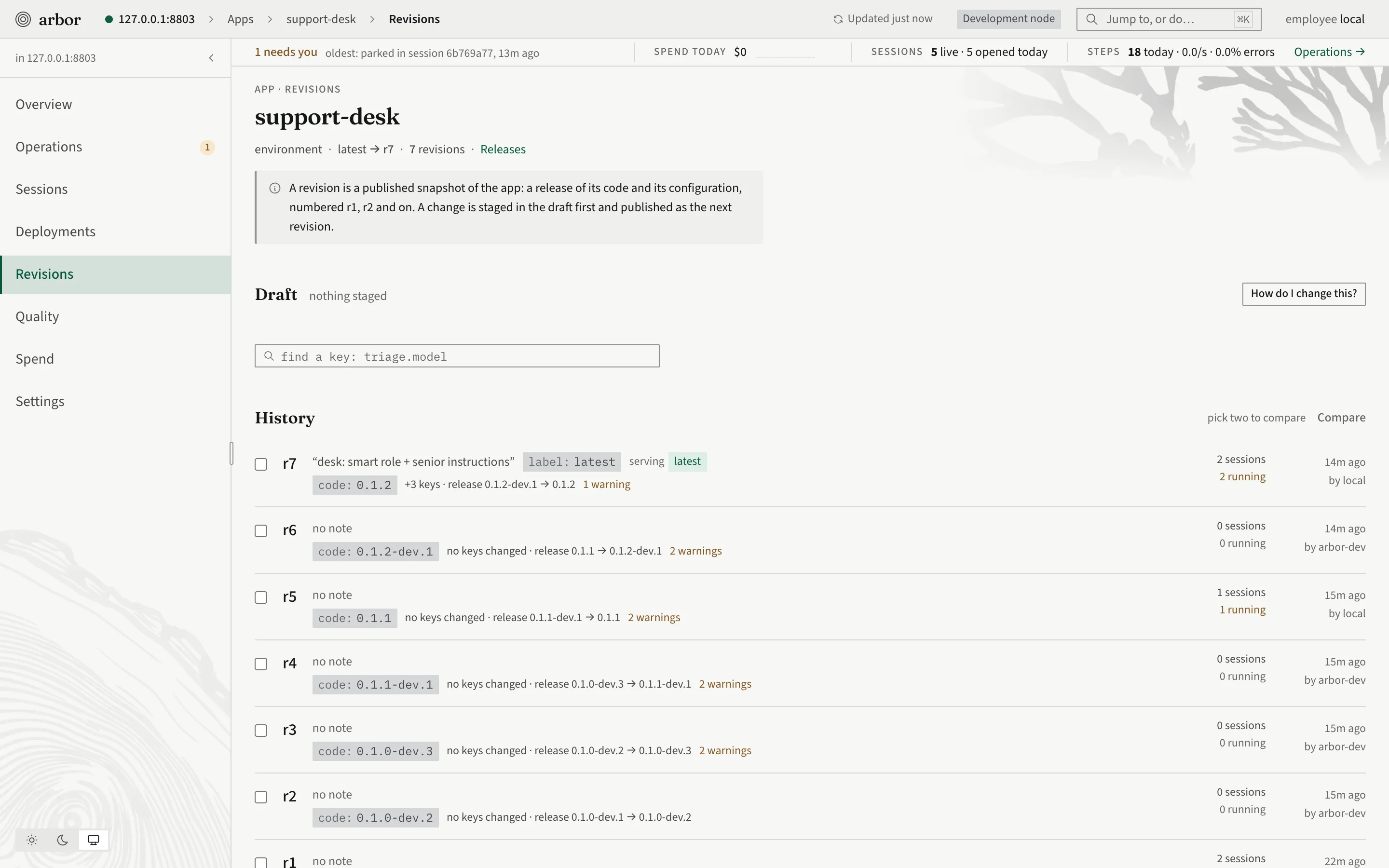
This is the guarantee the rest of the page leans on: publishing a new version never changes a conversation in progress. You can publish, move labels, move ingresses and roll back while sessions run, and none of those sessions notices.
Two exceptions:
- A prompt can point at a movable tag in the prompt store (
prompt.style: store:style@stable). The text is resolved when each session opens, so two sessions of one revision can pin different texts if you retag in between. Once a session has opened, its text is fixed. - A few settings are read live on purpose, because a running session should follow them:
schedule.<name>.*(pause, resume, a new spec),app.retention.*(when to archive and purge) and the coding settings (coding.*). Secrets are by reference (see below), so a rotated credential reaches running sessions at once. Everything else is pinned.
The draft: why settings changes are staged
If every settings set took effect the moment you typed it, two edits would be two live changes, a typo would reach users, and nobody could review. So settings changes go through a draft: the app’s one pending set of changes.
- Stage keys into the draft. Nothing is published.
- Review it: each change as
key: from → to, what blocks the publish (a required value missing, a prompt pointer that does not resolve) and what only warns. - Publish it. The whole draft becomes one new revision, and the
latestlabel moves to it.
The draft protects you from three things: a half-finished change going live, a change nobody looked at, and two people overwriting each other. If someone published while you were drafting, your publish fails with conflict.draft_stale instead of silently winning, and you review again. A draft left pending is a normal place to stop: the agent or developer says what it changes, and a person decides.
%% How a settings change goes from a draft to a new revision
flowchart LR
  stage["Stage keys<br/>nothing is live"] --> review["Review<br/>blocks and warnings"]
  review --> publish["Publish"]
  publish --> rev["New revision<br/>latest moves to it"]
  publish -. "someone published first" .-> stale["conflict.draft_stale<br/>review again"]
  stale -.-> review
Labels: names for revisions
A label is a movable name on a revision, like a git tag: latest, stable, canary, any name of up to 32 lowercase letters, digits, _ or - (but not rN). Publishing moves latest to the new revision. Other labels move only when you say so. A label has no effect on traffic by itself; it is a name that an ingress can follow.
The environment: where a copy of the app lives
An environment is a node (or a fleet) that the project knows by name, such as local, play or prod. Each has its own revision numbers, its own environment values, its own overrides, its own labels and ingresses. Revision 4 on play and revision 4 on prod are unrelated. That separation is the point: you try things on play, and prod moves only when you say so.
The project lists its environments in arbor.yaml (a name and a host), and keeps each one’s token under your home directory, never in the repository. Every command takes --env <name> and defaults to local.
The ingress: how your product reaches a revision
Your product should not hard-code r7. It opens a session through an ingress, a named address that holds a target:
- a label: new sessions get whichever revision the label names now;
- a fixed revision: new sessions always get that one;
- a split: weights that sum to 100, across revisions and labels (for example
stable=90,canary=10).
Every app has an ingress called latest that follows the latest label. You add your own, such as prod. An ingress also has a kind (http, or a2a for an app that declares an A2A composition; an a2a ingress requires a bearer token and refuses an anonymous caller, so a public, anonymous surface is an http ingress), may be private (only operators and services can open through it), and may push each outbox entry of its root to a webhook. Which roots the outside can reach is the bundle’s session.exposed list, not the ingress’s.
Only new sessions follow an ingress. Moving one changes nothing for a conversation that has already started. Every move is logged: arbor ingress log says who moved it where, and when.
Putting it together
%% How code and settings become what a new conversation runs
flowchart TB
  code["Your code<br/>package.json 0.1.0"] -- "deploy" --> release["Release 0.1.0<br/>never changes"]
  settings["Settings<br/>defaults + environment + overrides"] -- "draft publish or deploy" --> revision
  release --> revision["Revisions r1, r2, r3 ...<br/>a release plus settings, never change"]
  revision -- "named by" --> labels["Labels: latest, stable, canary<br/>move when you say"]
  labels -- "followed by" --> ingress["Ingresses: latest, prod<br/>move when you say"]
  ingress -- "new sessions open through" --> sessions["Sessions<br/>each pinned to one revision for life"]
Everything above the sessions can move. Nothing below the line “revision” is edited.
Who changes what, and how
| Thing | Where it lives | Changed by | How |
|---|---|---|---|
| Code | a release, built from app.ts and prompts/ |
the developer | edit, raise package.json’s version, arbor deploy --env <env> |
| Defaults | arbor.yaml |
the developer | edit the file; they ship with the next deploy |
| Environment values (model provider and model, endpoints) | the environment | the environment’s admin | arbor settings set model.smart.model=<model> --env <env>, then publish |
| Overrides | the environment | an operator | arbor settings set ..., arbor draft publish --env <env> |
| A revision | the environment’s catalog | nobody; it is made, not edited | arbor deploy or arbor draft publish makes the next one |
| A label | the environment | an operator | arbor label set <label> --revision <n> --env <env> |
| An ingress | the environment | an operator | arbor ingress set <name> --label <l> or --revision <n> or --split ... |
| A session’s revision | the session | nobody | chosen once, when it opens |
| Secrets | the environment’s secret store | an admin | by reference only (below) |
Secrets and variables are references
A credential is never a value in a settings document or in arbor.yaml. It is written as a reference, secret:<ref> or ${NAME}, and the node resolves it at the moment of use. A literal written where a secret belongs is shown back as [redacted] and is refused in a project’s defaults. An admin puts the value in the environment’s secret store with arbor admin secret set <scope>/<name>, from a file or an environment variable, never as an argument, and it is never read back. Because the reference is pinned and the value is looked up live, rotating a secret needs no publish. A plain variable (var.GREETING) is an ordinary setting that the bundle declares and an environment fills in.
Overlays: a trial, not a release
An overlay is a sparse patch of the same flat keys, laid over a revision for one question: what if this prompt were shorter? The tools that ask “what if” use it: arbor quality probe, arbor quality experiment and arbor session fork --prompt style=./brief.md. A session can also be given a value for a setting that allows it, at open: arbor session open --set app.caps=... (the key app.caps is the first that does). An overlay is never a live release. The only way a winning candidate reaches users is arbor quality experiment conclude --promote, which stages it into the draft, so the same review and publish stand in front of it.
Rollouts: what is built
Moving traffic gradually is done by hand, with a split on an ingress. There is no automatic ramp that steps from 10 to 50 to 100 percent, and no rule that rolls back when a number gets worse. You choose the weights, watch the result (arbor stats --app <app> --by revision, or --by ingress), and move them again. The older design for gateway routes and a canary header is gone; the ingress replaced it.
One app, from first publish to rollback
Here is a small support app, helpdesk, on an environment called play. The story has six steps. After each, a session that opened earlier is still on the revision it started on, and the table at the end shows the whole run at once.
1. The first publish
You have an app and want to ship it. The first publish makes a release and the first revision, and moves latest to it.
arbor deploy --env play --note "first deploy"deploy sends the sources (the node builds them), releases the version in package.json (0.1.0), publishes revision 1 and moves latest to it. If the environment is missing something the app needs, such as a model for a role, the release is kept and the revision is refused, with one line per missing value and the command to fix it. That is the common first-time stop: set the value (it is a settings change, as in step 2), publish the draft, and you do not upload again.
Your product should not follow latest, which moves on every publish. Give it its own labelled address:
arbor label set stable --revision 1 --env play
arbor ingress set prod --label stable --env play --note "the product's door"
Now prod hands out whatever stable names. A conversation opens:
A=$(arbor session open --ingress prod --env play)
arbor session get --session "$A" --env play
session get prints the session’s app, release and revision on its first line. This one says r1. Call it session A.
2. A settings change: drafted, reviewed, published
Sessions cost too much, and you want to cap each at 25 cents. That is a settings change, so it goes through a draft:
arbor settings set app.budget.session_micros=250000 --env play --note 'cap a session at 25 cents'
arbor draft review --env play
arbor draft publish --env play
settings set stages the key into the draft and prints the review, with the change as app.budget.session_micros: unset → 250000. Nothing is live yet. draft review lists the changes, the blocks and the warnings. draft publish makes revision 2 (same release, 0.1.0, new settings) and moves latest to it. The command prints the revision and latest -> 2.
Now check on session A:
arbor session get --session "$A" --env playIt still says r1, and it still has its old budget. Revision 2 exists, but nothing has pointed new sessions at it either: stable still names revision 1, so prod still hands out revision 1. Publishing and releasing to users are two separate steps, and the second is yours. When you have looked at it:
arbor label set stable --revision 2 --env playNew sessions through prod now get revision 2. Session B, opened after this, says r2. Session A carries on at r1 until it ends.
3. New code
The support agent needs a new tool. That is code, so it needs a new release. Edit app.ts, then raise the version in package.json to 0.2.0. The same version with different sources is refused (conflict.version_taken), and a change to the app’s contract (its roots, roles, inputs and the like) must raise the major version, or the minor below 1.0 (conflict.contract_changed).
You do not want the new code to take over immediately, and deploy moves latest by default. So give it a different label:
arbor deploy --env play --label canary --note "adds the lookup tool"This makes release 0.2.0 and revision 3, which carries the settings of revision 2 (the budget cap) with the new code. It puts the canary label on revision 3 and leaves latest and stable where they were. Nobody is on it yet.
4. Moving traffic to it
Send a tenth of new conversations through the new revision:
arbor ingress set prod --split stable=90,canary=10 --note ramp --env play
arbor ingress log prod --env play
ingress set creates or changes the ingress and keeps any flag you leave out. Each new session is placed by those weights. arbor stats --app helpdesk --by revision --window 24h --env play shows how each revision is doing. When you are happy, change the weights again, or send everything to it:
arbor ingress set prod --label canary --env playSessions that opened earlier stay where they are: A on revision 1, B on revision 2, and a canary session on revision 3.
%% Where new and existing sessions are after the ramp
flowchart LR
  prod["prod ingress<br/>stable=90, canary=10"] -- "90" --> r2["r2 (stable)"]
  prod -- "10" --> r3["r3 (canary)"]
  A["Session A"] -. "pinned" .-> r1["r1"]
  B["Session B"] -. "pinned" .-> r2
  C["A canary session"] -. "pinned" .-> r3
ingress set stages and publishes a one-change draft for itself, so it refuses with conflict.draft_pending while the app has a draft of its own waiting. Publish or discard that first.
5. Rolling back
The new tool has a bug. Rolling back is moving the pointer back, and nothing is rebuilt or deleted:
arbor ingress set prod --label stable --env playNew sessions through prod are on revision 2 again. The sessions already on revision 3 are not moved; they finish on the code they started on. (Arbor never moves a running session.) If you want revision 3 to stay unused, leave canary where it is; it is inert.
The same idea undoes a plain publish. If your product opens sessions through latest and a new revision misbehaves, move the label back:
arbor label set latest --revision 2 --env playThere is no default label for label set; you always name it. The revision’s settings come back with it, because they were part of the revision.
6. Promote to production
Everything above ran on play. To ship the release you tested, without rebuilding anything:
arbor deploy --env prod --release 0.2.0 --from playThis takes the released sources of 0.2.0 from play, builds them on prod, and refuses with conflict.digest_differs if the build does not match the origin’s. prod makes its own revision from its own settings (its own environment values and overrides), and you repeat the label and ingress moves there.
The whole run
%% The six steps in order, with the pointer each one moves
flowchart TB
  s1["1 First publish<br/>r1 made, latest and stable on r1"] --> s2["2 Settings change<br/>r2 made, stable moved to r2"]
  s2 --> s3["3 New code<br/>r3 made, canary on r3"]
  s3 --> s4["4 Ramp<br/>prod splits 90 stable, 10 canary"]
  s4 --> s5["5 Rollback<br/>prod follows stable again"]
s5 --> s6["6 Promote<br/>release 0.2.0 built on prod"]| After step | Revisions | stable |
canary |
prod ingress |
Session A | A session opened now |
|---|---|---|---|---|---|---|
| 1. First publish | r1 | r1 | none | follows stable |
opens on r1 | r1 |
2. Settings published, then stable moved |
r1, r2 | r2 | none | follows stable |
still r1 | r2 |
3. New code, labelled canary |
r1, r2, r3 | r2 | r3 | follows stable |
still r1 | r2 |
| 4. Ramp | r1, r2, r3 | r2 | r3 | 90% stable, 10% canary |
still r1 | r2 or r3 |
| 4b. Full move | r1, r2, r3 | r2 | r3 | follows canary |
still r1 | r3 |
| 5. Rollback | r1, r2, r3 | r2 | r3 | follows stable |
still r1 | r2 |
The one thing that never appears in the table is a revision changing. Only pointers move.
What to remember
- A revision is code plus settings, frozen. A session pins one for life.
- Settings change through a draft: stage, review, publish. Code changes through a release with a version you choose.
- Publishing makes a revision. Labels name revisions. Ingresses decide which revision new sessions get. Each step is separate, so you can stop between them.
- Rollback is moving a label or an ingress back.
- Environments are separate copies; promote a release between them with
deploy --release ... --from .... - Writes that go straight to live state are separate commands on purpose (
settings override,settings replace,label set,ingress set,deploy), so a permission rule can tell them from staging. settings overrideis the odd one: it writes the overrides document but publishes nothing, so nothing sees it until the next revision is published (arbor draft publish, orarbor deploy).