Dev workflow
Written and run by a coding agent. Reviewed by you.
Arbor was designed to be written and run by coding agents like Claude Code. It is built for the command line first, with a console for operators to keep track of things. The arbor CLI ships the docs, and your agent uses them.
Done by a coding agent
arbor docs, adds a staff role that joins by invitation and a refund tool that holds any refund over 100 dollars for staff, and lets arbor dev watch publish the build. A customer asks for a 250 dollar refund and the call waits. The agent seats Sam as staff and mints Sam's token, and Sam approves with it: the activity says "Approved by sam", and the app's desk tells the customer the refund is done. Claude Code's instructions approved the commands it ran and said the approval had to come from the staff member, not from it. It goes wrong on screen too: arbor build fails twice on the same type error before the agent changes its approach, and one combined command exits with an error. Edited only for privacy: the machine's username and a throwaway local token are blanked. Recorded on Arbor's main branch at 20e933de.An Arbor app has many moving parts: actors, prompts, settings, releases, evals, monitors, experiments. No settings screen makes that simple, and Arbor does not try. The assumption is that a coding agent builds and manages the app from a terminal, with a person reviewing. A person can type the same commands by hand.
So the command line is the main interface, and it was designed for a program to read. This page walks the whole loop in the order you (or your agent) would do it: get a node, make a project, find answers, write the app, run it, talk to it, change it, test it, ship it. Then it shows how your own product calls the app once it runs.
%% The dev loop, from an empty folder to a shipped app
flowchart TB
  node["1 A node"] --> init["2 arbor init"]
  init --> docs["3 arbor docs"]
  docs --> write["4 Write app.ts"]
  write --> build["5 build, dev watch"]
  build --> session["6 Open a session"]
  session --> settings["7 Draft, review, publish"]
  settings --> ship["8 deploy, ingress"]
  ship --> quality["9 arbor quality"]
  quality -. "change the app" .-> write
The building blocks page shows what goes inside an app. It does not say how an app is called. There are two ways, and they are different doors:
- While you build it, you call it with the
arborCLI.arbor session chatopens a conversation in your terminal. - From your product, you call it over the HTTP API, usually through the client library. The last section of this page covers that.
Both reach the same app, the same sessions and the same saved steps.
How the commands are named
The command tree follows the model. A command group is a noun from the model, in the singular: session, draft, release, revision, label, ingress, schedule, connection. A few mass nouns stay as they are: settings, docs, metrics, stats, quality. The same five verbs mean the same thing in every group:
| Verb | Means |
|---|---|
list |
read many |
get |
read one |
set |
write a record you name (a merge: a flag you leave out keeps its old value) |
add |
make a record the node names, inside its owner |
rm |
remove one |
Other verbs are the model’s own words and stay as they are: deploy, publish, open, send, follow, fork, compare. Commands that only an operator may run live under arbor admin.
Two flags appear everywhere. --env <env> names the environment (a node the project knows by name); it defaults to local. --json prints machine-readable output.
1. A node to run on
A node is a running Arbor process. For development you need one node, and it runs on a SQLite file: no Postgres, no Redis, no model key to start. Arbor is one binary.
brew tap loaapp/tap
brew trust loaapp/tap
brew install arbor
Get started walks through the install and a first app.
You rarely start a node by hand while building. arbor dev watch (step 5) starts the project’s own local node when nothing answers on its port. That node uses SQLite under ~/.arbor/projects/<name>/, accepts this machine without a token, and serves the console at http://127.0.0.1:8787/ui/. Its revisions are disposable: arbor dev reset --yes wipes it.
Two other commands run a node:
arbor serveruns one long-lived local node on SQLite under--data-dir(default~/.arbor) and serves the API and console on--listen(default127.0.0.1:8080). Add--devfor development mode, where an operator may fork a session or mint a participant’s token.arbor noderuns a node of a fleet: every node shares Postgres, Redis and a blob store. Moving from one node to a fleet changes flags, not application code.
2. Start a project with arbor init
arbor init --name hello
cd hello
init writes a project directory that already runs:
| File | What it is |
|---|---|
arbor.yaml |
The project: the app’s name, its npm scope, the environments it deploys to, the settings defaults every deploy carries, and a commented dev block for the local node. |
package.json |
The bundle’s version (0.1.0). A deploy releases it. |
app.ts |
A plain actor that replies to every message, written with @arbor/sdk. Nothing to install: the node provides the SDK. |
prompts/ |
Prompt defaults, one <id>.md each. |
.gitignore |
Keeps .arbor/ (the CLI’s state), .env (secrets), .npmrc.* and node_modules/ out of git. |
README.md |
A short readme. |
AGENTS.md |
For your coding agent: see below. |
AGENTS.md is short on purpose. It names the app, says where environments and tokens come from, carries a permission recipe to paste into Claude Code’s .claude/settings.json, and points at one command, arbor docs get docs/agent.md. The guidance itself lives in the binary, so upgrading arbor updates what your agent reads without touching your repository.
init refuses a directory that is not empty (conflict.not_empty) unless you pass --force.
3. Find answers with arbor docs
The documentation is in the binary. It works offline, and it matches the version that is running.
arbor docs list                        # the shipped documents
arbor docs search "held call"          # ranked sections: path:line, heading, snippet
arbor docs get docs/agent.md           # a whole document
arbor docs get docs/agent.md --heading "The rules"
A search prints the best matches, each as a path, a line, the section’s heading and a snippet. This is real output from the released binary:
$ arbor docs search "held call"
docs/scripting.md:1629  Writing Arbor bundles > 3. API reference > Held calls: approval, client tools, external work
    A tool call's outcome is a status: a result, an error, or held, waiting on a person's approval ...
arbor docs get <path> prints the document, or one section with --heading. A heading matches in any case, with or without its section number. --json on search prints [{path, line, heading, snippet, score}].
The first page for an agent to read is docs/agent.md. It lists the commands, the rules, and which commands an agent may run freely and which it must ask about.
4. Write the app
Your agent edits app.ts, the files in prompts/ and any docs the app ships. This is the app.ts that init writes for an app named hello:
import { actor, bundle, isMessage } from '@arbor/sdk';

// A plain actor: no model, one step per batch of messages. It replies to
// every user message; replace it with what your app does.
const greeter = actor('greeter', { state: {} })
  .wake('chat')
  .receive((ctx, batch) => {
    for (const m of batch) {
      if (isMessage(m, 'user_msg')) ctx.emit('reply', { text: 'hello: ' + m.body.text });
    }
  });

export default bundle({ app: 'hello', roots: [greeter], session: { exposed: [greeter] } });
To turn the actor into an agent, give it instructions and a model. The building blocks page shows each piece, one at a time.
5. Build and watch
arbor build            # check the app; publishes nothing
arbor dev watch        # run a local node, publish on every save
arbor build builds the app, type-checks it when the node finds tsc, and prints diagnostics. Without a tsc the check is skipped, and the result carries a warning that says so and how to install one. arbor build --json prints {ok, app, hash, bytes, out, warnings, diagnostics}, so an agent can pick out errors:
arbor build --json | jq '.diagnostics[] | select(.severity == "error")'arbor dev watch starts the project’s local node if none is running, builds the project, and publishes a development prerelease (<package.json version>-dev.N) under the latest label. It prints the app’s console page, its package and the registry. It also prints one line on whether builds are type-checked: type check: on (tsc …), or type check: off: with the command that installs tsc. Then it checks the project’s files every 500 ms. When a file changes it rebuilds, prints the diagnostics of a build that fails, and prints the version of one that lands. When the sources build the same thing as the last dev build, it reuses that build and says unchanged. --once builds once and exits. Ctrl-C stops the node, if this process started it.
6. Open a session and talk to it
A session is one conversation with your app. arbor session open starts one and prints its id alone on standard output, so a shell can capture it:
SID=$(arbor session open)
arbor session chat --session "$SID" --text "hello"
# hello: hello
session chat sends the message, then watches the reply arrive and prints it as it streams. That output is real, from the released binary on the hello app above. Without --text, chat reads messages from standard input, one per line, so it works as a small terminal chat.
The same steps, taken apart, are what an agent uses in a script:
arbor session open --env play                       # prints the session id
arbor session send --session "$SID" "hi"            # send one message
arbor session follow --session "$SID" --until reply --for 2m
arbor session outbox --session "$SID" --limit 50 --json
session sendposts a user message to the session’s entry root, or to a root named with--root.session followprints what the session says, from the start (or from--after <pos>), then as it happens.--until replyends the follow at the root’s first final reply (the entry root, or the one--rootnames) after the step that took your last message in: a reply from a turn that was already running when the message landed does not count as its answer.session chatwaits by the same rule.--forbounds it. A follow that is cut reopens from the last position it printed, and prints nothing twice.session outboxreads what the session has said so far, one JSON entry per line, as a participant sees it.
session open takes --app, --ingress (default latest), --root (default: the first root the app exposes), --input k=v and --label k=v. It also takes --set key=value, which gives this one session a value of a setting that allows it (app.caps is the first). Inside a project the app is the project’s own.
Sends and opens go out under an Idempotency-Key. The CLI prints it on standard error as key: …. If a run fails and you cannot tell whether it went through, run it again with --key <that key>: the node answers the first attempt, marked repeated, instead of storing a second message or opening a second session.
To see what happened inside a session, read it as activities:
arbor session activity --session "$SID"It prints each actor’s busy period in plain sentences: the message it read, what the model said, each tool it ran and its result, the children it started, what it waited on, its reply, and any failure. It is the first thing to read after a run that went wrong. --mechanics adds the bookkeeping; --json prints the underlying view.
Other people can join the same session in a role (arbor session join --session <id> --role <role>), and calls that wait on a person are listed and answered with arbor session call list and arbor session call answer. The call’s id goes in --call, never as a bare word after the command. An approval addressed to a role is answered by a participant seated in that role: on a dev node, mint the person’s token with arbor dev token --subject <s> --audience <a>, seat them with arbor session join --token, and answer with --token, and the answer is theirs, not the operator’s. A session’s clock can be advanced on a development node (arbor admin session clock advance --session <id> --by 24h), so a follow-up the app set for itself a day out fires now, and you can test it without waiting.
7. Change settings: draft, review, publish
An app’s configuration is one document of flat keys: actor.front.model.model, prompt.style, tool.lookup.description, app.budget.session_micros. Changes do not go live as you type them. They go through three steps:
- Stage keys into the app’s draft. This publishes nothing.
- Review the draft: each change by key, what blocks the publish, what only warns.
- Publish the draft as one new revision. A revision is one saved version of the app’s configuration, and
latestmoves to it.
Before changing an app you have not seen, read what it is and which keys exist:
arbor release sheet --env play        # the app's actors, prompts, roles and needs
arbor settings schema --env play      # every key: type, default, description
arbor settings schema actor. --env play
arbor settings get role.user --env play
Then stage, review and publish. This transcript was recorded on 25 October 2026, against an app named helpdesk; the current CLI prints the same lines:
$ arbor settings set app.budget.session_micros=250000 --env play --note 'cap a session at 25 cents'
staged into helpdesk's draft on play:
  app.budget.session_micros: unset → 250000
Review it with arbor draft review --env play; publish it with arbor draft publish --env play, or drop it with arbor draft discard --env play.

$ arbor draft publish --env play
- revision 4 (bundle helpdesk@0.1.0) - published
- latest -> 4
The value in key=value is read as JSON when it parses as JSON, else as a string. key= or --null key removes a key. If the draft’s base has moved on, the publish fails with conflict.draft_stale: review again. A block is req.invalid.draft, with each blocker named.
A draft left pending is the normal end of an agent’s task. The agent says what the draft changes (arbor draft review --env <env>) and that it is ready to publish, and a person decides.
To undo a publish, move the label back to the revision it named before:
arbor label set latest --revision 3 --env playChanging what runs without a draft is a different command on purpose: settings replace, deploy and a label or ingress move take effect at once. arbor settings override writes the overrides document with no draft, but nothing sees it until the next draft publish or deploy makes a revision. A write with a different effect is its own command, never a flag on a safe one. That is how a permission rule can tell them apart.
Some defaults belong to every environment and should ship with the code. Those go in arbor.yaml under defaults. What lives on only one node (a model’s configuration, a provider, a credential, a host) is staged in that environment with settings set. arbor pull --env <env> [--dry-run] brings what an environment tuned back into the project’s files.
8. Ship to an environment, and let a product reach it
Everything so far ran on the local node. An environment is a node the project knows by name. Add one, log in to it, and deploy:
arbor env set --name play --host <url>
arbor env login --env play --code <invite>        # or --token-stdin
arbor deploy --env play --note "first deploy"
The token is stored under ~/.arbor/envs/<project>/<env>/token, never in the project. arbor deploy sends the sources (the node builds them), releases the version in package.json, publishes a revision and moves latest. New code needs a new version: the same version with other sources is refused as conflict.version_taken, and the refusal names the version to use. To move a release between environments, arbor deploy --env prod --release <version> --from play.
A product reaches an app through an ingress: a named address that sessions are opened through. It holds a target (one revision, a label, or a split across them), a kind (http by default, or a2a for an app that declares an A2A composition; an a2a ingress needs a bearer token and refuses anonymous callers), and, optionally, an outbound target. Every app has one called latest. Which roots the outside can reach is the bundle’s session.exposed list (the exposed: [greeter] in the example above).
arbor ingress list --env prod
arbor ingress set prod --split latest=90,canary=10 --note ramp --env prod
arbor ingress log prod --env prod
ingress set creates the ingress if it does not exist, and a flag you leave out keeps its old value. --private lets only operators and services open through it. Only new sessions follow an ingress, so moving one never changes a conversation already running. An ingress can also push each saved outbox entry of its root to a webhook (--outbound '{"kind":"webhook","url":…,"credential":"secret:<ref>"}'), which is how a channel with no browser listening, such as SMS or email, is fed.
9. Test: evals, probes, experiments, monitors, benchmarks
Everything for testing is under arbor quality. The terms, from smallest to largest:
- An eval is a question asked of a conversation: when it applies (a matcher), what to check, and optionally a judge. A grade is its verdict on one moment.
- A case is a kept slice of a session, with the grades it had. Each case has one owner, an experiment or a benchmark.
- A probe is an ad hoc what-if: fork a live session at one point, change something, and grade the replay.
- An experiment is a question with a base revision, numbered candidates (each a change laid over the base), its cases, and the evals it decides by.
- A benchmark is a standing set of cases, run against each new revision, with its score tracked over time.
- A monitor runs evals over live sessions: a filter picks the sessions, a sample says how many to grade, and a trigger says when.
Write an eval, then ask a what-if of a session that already happened:
arbor quality eval set asks-first \
  --matcher '{"when":{"actor_ran":{"definition":"triage"}}}' \
  --rubric "Asks before it refunds." --score asked

arbor quality probe add --session s-1 --at 42 --set prompt.style='{"text":"brief"}'
--at 42 is a position in the session’s record. Pass back a position you were given by session follow or session outbox; do not count.
Tuning an app is a loop. Propose a change as a candidate, run it against the cases, read the report, and promote the winner into the draft:
arbor quality experiment add --question "does a brief style refund better?" \
  --eval refunds --set prompt.style='{"text":"brief"}'
arbor quality experiment run <experiment>
arbor quality experiment report <experiment>
arbor quality experiment candidate add <experiment> --set prompt.style='{"text":"terse"}'
arbor quality experiment holdout <experiment>
arbor quality experiment conclude <experiment> --promote c2
experiment run follows the run to its end and prints one row per arm: its score, each eval’s mean and count, its cost and its rank. holdout grades the held-out cases once. conclude --promote stages the winning candidate into the draft and publishes nothing, so the usual review and publish still stand between a test result and your users. A run exits 1 when a replay could not run; a low grade never fails a run.
%% From a candidate change to your users, with a person at the end
flowchart TB
  add["experiment add<br/>a question and a change"] --> run["experiment run<br/>one row per arm"]
  run --> report["experiment report"]
  report --> holdout["holdout<br/>grade held-out cases once"]
  holdout --> conclude["conclude --promote c2"]
  conclude --> draft["Staged in the draft<br/>nothing published"]
  draft --> publish["draft review,<br/>draft publish"]
A probe becomes a case with quality probe keep, or a whole experiment with quality probe formalize. A benchmark and a monitor are written the same way:
arbor quality benchmark set refunds --every-revision --note "the refunds that went wrong"
arbor quality benchmark run refunds r3 r4 r5
arbor quality monitor set web-refunds --evals refunds --trigger after:24h --sample 0.25 --ceiling 40 --ingress web
benchmark run replays its cases under each revision you name and exits non-zero when a replay could not run, which makes it fit for a CI step. arbor quality benchmark history and heatmap show the score by revision. --ceiling 40 caps a monitor at forty grades an hour.
10. Copy a conversation to compare
To try a change on a conversation that already happened, fork it. A fork copies a session up to a position and runs on from there, with the change you choose, while the original stays as it was:
arbor session fork --session s-1 --at 42 --prompt style=./brief.md
arbor session compare --session s-1 --with s-2
fork prints the new session’s id first. A plain fork needs a development node. --replay forks as a replay on any node: its model calls are answered from the original’s record, at no cost, until the first request that the record does not hold, where it branches. arbor session replay --session s-1 --revision 5 does that against another revision. session compare prints each side’s spend and the first step where the two differ; --json prints the whole comparison.
11. Seed the sample apps
Arbor’s repository carries a set of small example apps, examples/seed/, numbered so that each adds one capability to the one before. arbor seed publishes them to a node:
arbor seed                       # every app under examples/seed
arbor seed --only 06-team        # one, by directory or app name
arbor seed --reset               # end each app's running sessions first
For each app it stores the prompts, builds the sources as latest, and puts the app’s settings. It prints one line per app, and exits non-zero if any failed. --dir points it at another directory of apps. It reads the apps from a directory on disk, so run it where that directory is.
12. The console, for operators
The console ships inside the arbor binary and is served by every node at /ui/. On a dev node that is http://127.0.0.1:8787/ui/. It shows what is there: sessions, the actor tree, timelines, traces, costs by app, actor and model, the configuration and its history.
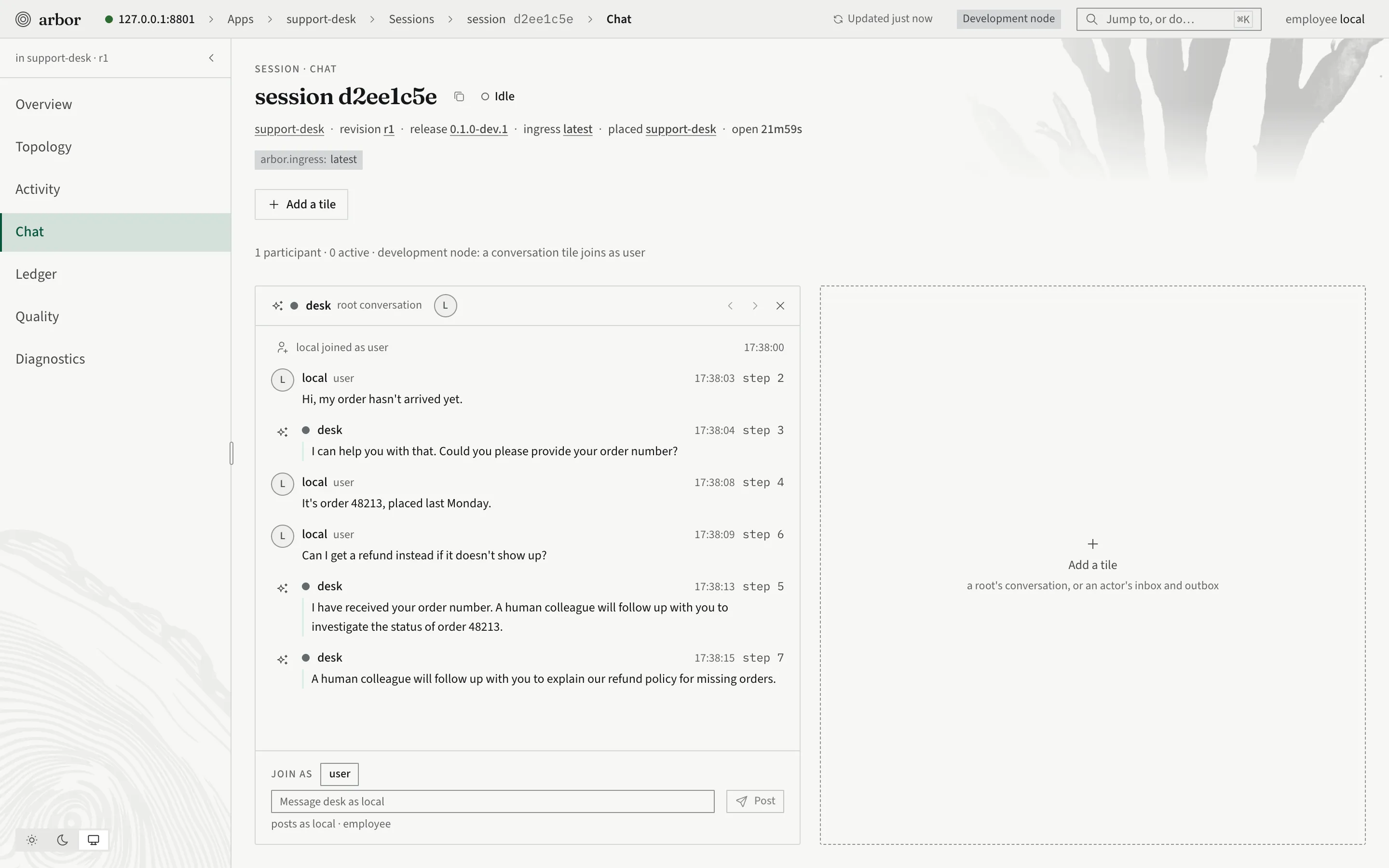
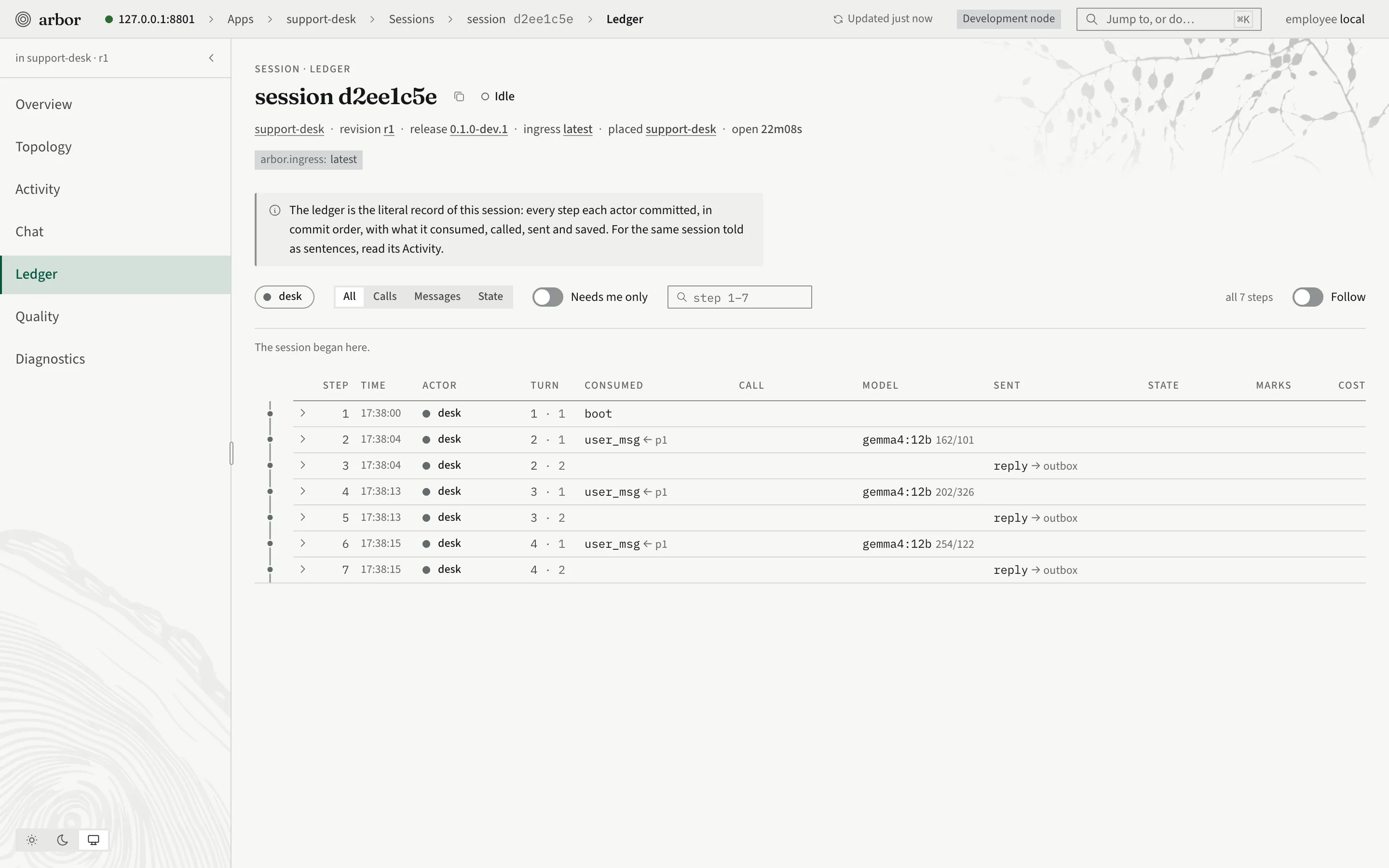
The console has a different job from the CLI. It is for looking and for review: a person sees a session’s traces and cost, reads a draft, and decides. The work of changing an app goes through the terminal. The same numbers are on the command line for an agent that needs them:
arbor stats --app hello --by revision --window 24h
arbor metrics list
arbor metrics series arbor.llm.latency_seconds --agg p99 --where bundle.app=care
arbor admin session watch --session s-1 --for 30s
Traces, logs and metrics are also exported over OpenTelemetry (--otlp on a node).
The CLI’s contract for agents
An agent can only drive a tool whose behavior it can predict. These rules hold across the whole command tree.
Everything answers in JSON. Every command takes --json, except the ones that run or load a node (serve, node, soak, seed, admin migrate). It prints the node’s JSON response unchanged, or the small object the command’s help names. Shape it with jq; there is no field selection.
An error is one JSON object on standard error, with a stable code, the fields at fault, and whether trying again can help. Match on code by prefix. Without --json the same error is prose. Real output from the released binary:
$ arbor session open --app router-demo --root nope --json; echo "exit $?"
{"code":"conflict.ingress_root","reason":"ingress \"latest\" of app \"router-demo\" yields no
 revision with root \"nope\"","details":[{"field":"ingress","code":"ingress", ...},{"field":"root","code":"not_defined", ...}],
 "retryable":false,"trace_id":"…"}
exit 5
The exit code follows the kind of error.
| Code prefix | Exit |
|---|---|
req.* (the request is wrong) |
2 |
auth.* |
3 |
not_found.* |
4 |
conflict.* |
5 |
unavailable.* |
6 |
limit.* |
7 |
| cancelled (Ctrl-C) | 130 |
| anything else | 1 |
A destructive command needs --yes. rm, purge, erase, discard, terminate, revoke, kill, reset and their like run only with --yes. Without it, a terminal is asked once. A script, a pipe or --json is refused at once with req.invalid.params (field yes, exit 2), before anything is sent. It never waits for a keypress. Nothing else in the CLI prompts.
Nothing pages; lists return a cursor. A list takes --limit and --after, and its JSON carries next, absent at the end. Pass back the pos or next you were given; positions are the node’s, not a count.
The environment is written out. Pass --env <env> right after the command’s words, every time. A permission rule can only see a flag that is written.
Staging and publishing are separate commands. An agent may stage freely. Publishing, deploying and moving labels or ingresses are the ones a person is asked about. The recipe init writes into AGENTS.md allows reads and staging (settings get, settings set, draft review, build, session, quality, docs, release, and so on), asks before the live changes (draft publish, deploy, label set, ingress set, settings override, session terminate, dev token, and every … rm), and denies nothing. A lower environment can allow draft publish --env test while production still asks.
Secrets are references. A credential in a project is secret:<ref> or ${NAME}, never a value. The value is put in the environment’s secret plane by an admin, from standard input or a file, never as an argument. When the app needs a person to authorize a connection, the agent hands over the URL that arbor connection authorize prints and never opens it itself.
Calling Arbor from your product
The CLI is for building. Your product talks to the node over the HTTP API, and the client library, @arbor/client, wraps it for the browser and for Node, with no runtime dependencies. The API for a participant is small: open a session, post messages, and read one stream.
You already saw the CLI make these calls. session open is the first request below, session send the second, and session follow the third.
%% How a product opens a session, sends a message and reads the reply
sequenceDiagram
  participant P as Your product
  participant A as Arbor node
  P->>A: POST open a session through an ingress
  A-->>P: session id (and a token for an anonymous caller)
  P->>A: POST a message to a root
  A-->>P: saved message id and position
  P->>A: GET outbox with follow=true
  A-->>P: delta frames, words as the model writes them (not saved)
  A-->>P: message frame, the saved reply with its position
Open a session through an ingress (latest here), at a root the app exposes:
curl -X POST "$NODE/v1/apps/hello/ingress/latest/sessions" \
  -H "Authorization: Bearer $TOKEN" \
  -H "Idempotency-Key: $(uuidgen)" \
  -H "Content-Type: application/json" \
  -d '{"root":"greeter"}'
The answer carries the session’s id, the app, its roots, and, for an anonymous caller, a session token. The body may also carry params (the session’s inputs), labels, external_id (your own key for the session: a repeat answers the session it already names) and budget_micros.
Post a message to a root of the session:
curl -X POST "$NODE/v1/apps/hello/sessions/$SID/roots/greeter/messages" \
  -H "Authorization: Bearer $TOKEN" \
  -H "Idempotency-Key: $(uuidgen)" \
  -H "Content-Type: application/json" \
  -d '{"kind":"user_msg","payload":{"text":"hi"}}'
The answer carries the saved message’s id and its position. A write with an Idempotency-Key that is repeated lands once, so a retry after a lost answer cannot make a second message.
Read one stream. Everything the session sends out arrives on a single server-sent-events stream, the session’s outbox:
curl -N "$NODE/v1/apps/hello/sessions/$SID/outbox?follow=true&after=0" \
  -H "Authorization: Bearer $TOKEN" \
  -H "Accept: text/event-stream"
Each saved entry has a position. A client that reconnects passes the last position it saw as after, and receives every entry after it, so a page reload rebuilds the whole conversation the same way. The stream also carries the words of a reply as the model writes them (delta frames, not saved) and the saved reply (the message frame, with a position). A participant reads the outbox and never an actor’s private record; each entry is addressed, so a person sees only what they may see.
On a dev node, arbor dev token --subject pat --audience customer mints a participant’s token to try this with. A real product gets tokens from its own sign-in, or from the node’s managed identities.
With the client library
The library does the same three things, plus the retries, the reconnects and the waiting calls. This is a complete client, and it type-checks against the client library:
import { connect } from '@arbor/client';

const arbor = connect({ url: 'http://127.0.0.1:8787' }); // add token: '…' for a node that asks for one

// Open a session at a root the app exposes (the first, when none is named).
const session = await arbor.sessions.open('hello', { root: 'greeter' });
await session.send('hi');

// One stream carries everything the session sends out.
let live = '';
for await (const frame of session.follow()) {
  if (frame.type === 'delta') {
    live += frame.text; // words as the model writes them: not saved
  } else if (frame.type === 'message' && frame.kind === 'reply') {
    console.log('saved at position', frame.pos, JSON.stringify(frame.payload));
    break;
  }
}
A few things it handles for you:
- Every write carries one
Idempotency-Keyand is repeated under the same key, at most three attempts, when it cannot tell whether the first one applied. A refusal is thrown at once. - A stream that ends or drops is reopened from the last position it saw.
- Every failure is an
ArborErrorcarrying the node’s error envelope:code,reason,details,retryable,traceId. It is the same envelope the CLI prints. - A call that waits on the caller (an approval, or a tool that runs in the browser) arrives on the stream, and
session.answer(…)or a client tool answers it. - A backend can post to a partition by key, such as a customer id, without knowing any session id:
partitions.send(app, key, text, { root }). Arbor delivers the message to that customer’s open session, or opens one.
The node can also build a typed client for each app from the app’s own declaration, and serve that package from the registry built into the node (arbor npm setup writes the .npmrc that points npm at it). The app’s roots, roles, client tools and events then arrive as types.